

- Ask an agent to explain how a tenant is wired together — sources, environments, domains, clients, deployments.
- Have an agent write a mapping schema, dry-run it against a real source entity, and save a new version.
- Investigate a view or route that is not producing what you expect.
- Query your tenant logs and metrics in natural language.
Hostname
A health check is available without authentication:
The server speaks MCP Streamable HTTP on the root URL, and nothing else. Choose the HTTP or Streamable HTTP transport in your client. The older SSE transport does not work: a client set to SSE can complete the sign-in and then fail on its first request with an HTTP 400 error. There is no
/sse endpoint — always configure the root URL.How authentication works
You sign in with your existing Enterspeed account, over OAuth. The first time your client connects, a browser window opens and you authenticate with your normal Enterspeed credentials. The session then acts as you, with the permissions your account has in each tenant. An API key is refused as authentication on this server. Management API keys still exist, and this server has tools that list, rotate, and set an expiry on them, but a request that authenticates with anx-api-key header is turned away. Environment client keys belong to Query MCP.
Selecting a tenant
A sign-in names a person, not a tenant, so every signed-in session has to select a tenant before any tenant-scoped tool works — even if your account belongs to only one. The server’sset_tenant_context tool does this, and whoami lists the tenants your account belongs to. You rarely call either by hand; ask your client:
Which Enterspeed tenants do I have access to? Select the one called Acme.The selection is held in memory by the server instance that handled it. If your client reconnects, or the server restarts, a tool call can come back saying no tenant is selected. Nothing is lost when that happens: select the tenant again and carry on. Your client lists the same tools before and after you select a tenant. A tenant-scoped tool called without a selection is still listed, and calling it fails against the Management API rather than telling you a tenant is missing, so run
whoami if a call is refused and you are not sure which tenant the session is on. It reports the tenant in force, or tells you to select one. What the list depends on is the toolsets parameter (see Limiting a connection) and your account’s access level, never which tenant you picked.
What the server can and cannot do
The server exposes 40 tools, made up of 23 reads, 16 writes, andset_tenant_context, which selects the tenant for the session and changes nothing in it.
- Reads cover the tenant overview, sources and source entities, mapping schemas and deployments, views and routes, indexes and index documents, domains and hostnames, destinations, environment and management clients, logs, and metrics. One read,
diagnose_missing_content, combines several of them to find where content stops on its way to a URL. - Four writes are additive.
create_tenant,create_mapping_schema,create_destination, andcreate_environment_clientonly ever add. - Twelve writes can change or replace something that already exists. They are the four
upsert_*tools,update_environment_client,configure_destination,save_mapping_schema_version,deploy_mapping_schema,unpublish_mapping_schema,ingest_source_entities,rotate_management_client, andset_management_client_expiry. An upsert can change an existing resource as well as create one,configure_destinationcan change an environment’s existing destination setup, an unpublish stops an environment serving a schema’s views, a deploy changes what an environment serves, an ingest overwrites entities with the same origin id, and the two tools for management clients can end a key’s life early.
Limiting a connection
The server can only do what your account is allowed to do. To give an agent less than that, add parameters to the server URL when you configure your client. They are set by the person configuring the client, not by the agent, so nothing said in a conversation can lift them — you change them by reconnecting with a different URL.
Combine them with
&, and wrap the URL in double quotes on the command line so your shell does not split it:
readOnly=true or readOnly=false, such as readOnly=1, an empty readOnly=, or the parameter given twice, makes the connection read only. A malformed tenantId refuses every tenant. So does a list with even one entry the server cannot read. The entries it can read are refused too, and the refusal names each entry it could not read. Give several tenants as one value with commas between them, because giving the parameter twice (?tenantId=…&tenantId=…) also refuses every tenant. An unknown group name in toolsets, or an empty value, offers core only. In each case the refusal names the parameter, and whoami reports how the connection was read.
whoami reports the pinned tenants in connection.pinnedTenantIds. It is null when the connection is not pinned, the list of tenants when it is, and an empty list when the pin could not be read. Check it after connecting. The pin only works if your client sends the query string with every request, and a client that drops it opens an unpinned connection without saying so.
Leave all three off and the connection offers every tool, on every tenant your account can reach. toolsets is not a security control — it decides which tools the client is offered, which also helps clients that cap how many tools they load across all servers.
Guardrails
Beyond your account’s own permissions and the connection parameters above, the hosted server applies four limits you should know about.Every deploy and unpublish asks you to confirm first
Every deploy and unpublish asks you to confirm first
deploy_mapping_schema and unpublish_mapping_schema ask you directly, in your client, before anything changes. The prompt names the schema, the versions and the environment, and you confirm by typing the environment’s name. Declining, cancelling, a name that doesn’t match, or no answer within about 50 seconds changes nothing.This applies to every environment, whatever it is called. You can deploy to any environment your account can deploy to in the Management App.The prompt needs a client that supports MCP elicitation, such as Claude Code, Codex, GitHub Copilot CLI, VS Code or Cursor. Clients that don’t, such as Claude.ai, Claude Desktop chat and Gemini CLI, are refused for these two tools; deploy from the Management App instead.The Claude desktop app (including Cowork) doesn’t work for these two tools today either. It says it supports confirmation prompts but never shows one (claude-ai-mcp#1085, claude-ai-mcp#1046), so after about a minute the tool returns confirmation_not_shown and nothing is changed. Use Claude Code or the Management App to deploy and unpublish.Access keys are never returned through MCP
Access keys are never returned through MCP
The server strips the
accessKey field out of every response before your client sees it, at every level of nesting. This covers environment client keys and source ingest keys.It applies even to the tools that mint a key. create_environment_client creates the client and rotate_management_client replaces a management client’s key, but the key value is in neither response. The agent is told a key was created and that it must be collected from the app — so it reports the right next step instead of inventing a value. Fetch the key in the Management App when you need it.The field is removed rather than masked, so no tool can observe a key at any point.Rate limit — 60 requests per minute per person
Rate limit — 60 requests per minute per person
Requests are counted per signed-in person, over a fixed one-minute window. Exceeding the limit returns:Well-behaved MCP clients back off and retry. The limit applies to the whole MCP endpoint, and
/health is exempt. It is counted by each server instance separately, so treat it as the rate a client should stay under rather than an exact figure.For comparison, Query MCP allows 120 requests per minute.Answers fit a 44,000-character budget, and values are never cut
Answers fit a 44,000-character budget, and values are never cut
Every answer is kept to about 44,000 characters, so your client can read it in full instead of saving it to a file. The server never shortens a value to get there. A schema body, an entity, a view or a log line comes back whole or not at all.
- A list that doesn’t fit holds back whole rows from the end. The answer then has
truncated: true, andtruncationNotesays how many rows fit and how to narrow the request. list_source_entities,list_viewsandinspect_routealso return acontinuationToken. Pass it back to carry on from the row right after the last one returned, with no rows repeated or skipped.query_tenant_logsreturns ascrollIdonly when the answer ends exactly where a page of log lines ends. Otherwise it returnstruncated: truewithout one; narrow the time range or the filters to see the rest.- A single item larger than the budget is returned whole, with
oversizeNoteas the answer’s first property. Such an answer is over the budget, so some clients save it to a file.
Security model
If you are reviewing this server before pointing an agent at your tenant, this is the short version:- No server-held credentials. The server has no Enterspeed credential of its own. It acts only as the person who signed in, and an API key is refused as authentication.
- Passthrough authorisation. Every permission decision is made by the Management API against your account, not by the MCP server.
- No deletes. The server cannot issue a
DELETEor aPATCHat all. Twelve writes can still change or replace existing configuration or content. See What the server can and cannot do. - Secrets are not readable. Access keys are removed from responses at the HTTP boundary, so no tool can observe one.
- Errors don’t expose internals. An error answer never contains internal host names, stack traces or the body of a server error. It carries a
traceIdinstead, which Enterspeed support can use to find the call. - Every deploy and unpublish is confirmed in your client. You type the environment’s name before anything changes. A client set to auto-approve can answer for you, so keep that off on connections that can deploy.
- Least privilege is yours to set. Connect with
?readOnly=trueunless the agent needs to write, and with?tenantId=to keep it on the tenants you name. See Limiting a connection.
Connecting a client
Every client connects the same way underneath: you give it the server URL, it sends you to Enterspeed in a browser window, and you sign in with your normal Enterspeed credentials. Nothing goes into your client’s configuration except the URL — with any connection parameters you want on it.Every client below opens the remote server directly and takes you through the sign in itself. None of them needs Node.js or a bridge program on your machine. Claude Desktop’s
claude_desktop_config.json file would, because it only starts local programs, so use its Connectors screen instead. The mcp-remote bridge is only for a client that cannot open a remote server.Agent CLIs
- Claude Code
- Codex
- Gemini CLI
- Copilot CLI
/mcp, and pick enterspeed-management to sign in. A browser window opens; authenticate with your Enterspeed credentials.This installs the server for the current project only. Add
--scope user to make it available in every project.Web
- Claude.ai
- ChatGPT
On a Team or Enterprise plan only an Owner can add a custom connector. The Owner adds it under Organization settings, then Connectors. Everyone else finds it under Customize, then Connectors, and clicks Connect.
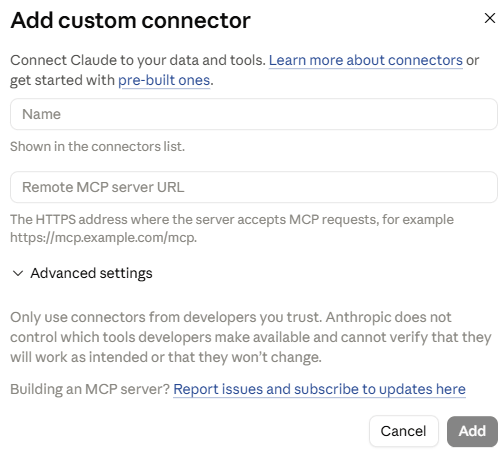
- Open Customize, then Connectors.
- Click + and then Add custom connector.
-
Give it a name, for example
Enterspeed Management, and pastehttps://mcp.management.enterspeed.com/as the remote MCP server URL. -
Click Add, then sign in with your Enterspeed account when Claude asks.
Desktop apps
Claude Desktop uses the same Connectors steps as Claude.ai, including the note for Team and Enterprise plans. The only difference is that after you click Add, the sign-in opens in a browser window.There is no reason to use
claude_desktop_config.json for this server. That file starts local programs, so it would need the mcp-remote bridge, and the result would be the same sign-in the Connectors screen gives you. On Query MCP the config-file route exists because it can carry a scoped key; this server does not accept keys.IDEs
- Cursor
- VS Code
Cursor reads MCP servers from A remote server is identified by
~/.cursor/mcp.json for every project, or .cursor/mcp.json for one.url, and there is no type field to set. Cursor takes you through the Enterspeed sign in in your browser when it first connects.Other MCP clients
The server is client-agnostic. Any MCP client that can open a remote Streamable HTTP server and follow an OAuth sign-in works — point it at the root URL above. If a client cannot open a remote server, or does not complete the sign in, putmcp-remote in front of it. Configure it as a local command, npx -y mcp-remote "https://mcp.management.enterspeed.com/", and the bridge handles the remote connection and the sign in for the client.
Sample prompts
Use these to smoke-test a fresh connection. OrientationGive me an overview of my Enterspeed tenant — how many sources, environments, and domains do I have, and how are they connected?Schema investigation
List my mapping schemas and show me the current version of the one that produces my product pages. What triggers it?Authoring loop (needs write permission in the tenant, and a connection without
?readOnly=true)
Write an index schema that indexes my article entities with title, publish date, and author. Dry-run it against a real article first, then save it as a new version.
Troubleshooting
The route for /products/red-shoe is not returning what I expect. Inspect the route and the view behind it and tell me what is wrong.
Logs
Show me any processing errors in the last 24 hours, grouped by schema.