> ## Documentation Index
> Fetch the complete documentation index at: https://docs.enterspeed.com/llms.txt
> Use this file to discover all available pages before exploring further.

# 4. Fetching data

# Fetching data in the frontend

Now it's time to get the data into the frontend. If you wish you can copy the demo project below, or simply follow along.

## Setting up the demo project

<Warning>
  This project uses Netlify functions to securely fetch data from Enterspeed. If you don't wish to use Netlify functions simply move the `enterspeed.js` to another folder and remove the `netlify-cli` dependency.
</Warning>

Go to our GitHub-repo ([https://github.com/enterspeedhq/enterspeed-demos/tree/master/vanilla-js](https://github.com/enterspeedhq/enterspeed-demos/tree/master/vanilla-js)) and clone the project.

cd into the **vanilla-js** folder and run:

```bash theme={null}
npm install
netlify dev
```

Create a file called **.env.local** and insert your environment API key generated in the Enterspeed-app under Environments like this:

```javascript title=".env.local" theme={null}
ENTERSPEED_PRODUCTION_ENVIRONMENT_API_KEY = [YOUR_ENTERSPEED_API_KEY_HERE];
```

<Danger>
  For a production environment, your API key should be injected on build time or via a serverless function.
</Danger>

## Ways of fetching data

Fetching data from Enterspeed can be done in three different ways:

* By using **Handle**
* By using **URL**
* By using **ID**

On our demo site, we've used **handle** and **URL**.

**Handle** and **ID** are good ways of fetching data for "non-site-specific data", e.g. the navigation. In this demo, we're using the **handle** method to fetch the blog list.

We're using the **URL** method to fetch all of the individual blog posts.

When the data is fetched you can choose to either generate it client-side, server-side, or at build time. In this demo we're generating it all client-side.

Data can be fetched using the [Fetch API](https://developer.mozilla.org/en-US/docs/Web/API/Fetch_API/Using_Fetch) or a library like [Axios](https://www.npmjs.com/package/axios).

In our demo, we have made a component that fetches the data. You'll find it in the project under "netlify/functions/enterspeed.js". The components look like this:

```javascript title="enterspeed.js" theme={null}
require("dotenv").config();

const fetch = (...args) =>
  import("node-fetch").then(({ default: fetch }) => fetch(...args));

const API_ENDPOINT = "https://delivery.enterspeed.com/v2";

exports.handler = async (event, context) => {
  try {
    const response = await fetch(`${API_ENDPOINT}?${event.rawQuery}`, {
      headers: {
        "Content-Type": "application/json",
        "X-Api-key": process.env.ENTERSPEED_PRODUCTION_ENVIRONMENT_API_KEY,
      },
    });
    const data = await response.json();
    return { statusCode: 200, body: JSON.stringify({ data }) };
  } catch (error) {
    console.log(error);
    return {
      statusCode: 500,
      body: JSON.stringify({ error: "Failed fetching data" }),
    };
  }
};
```

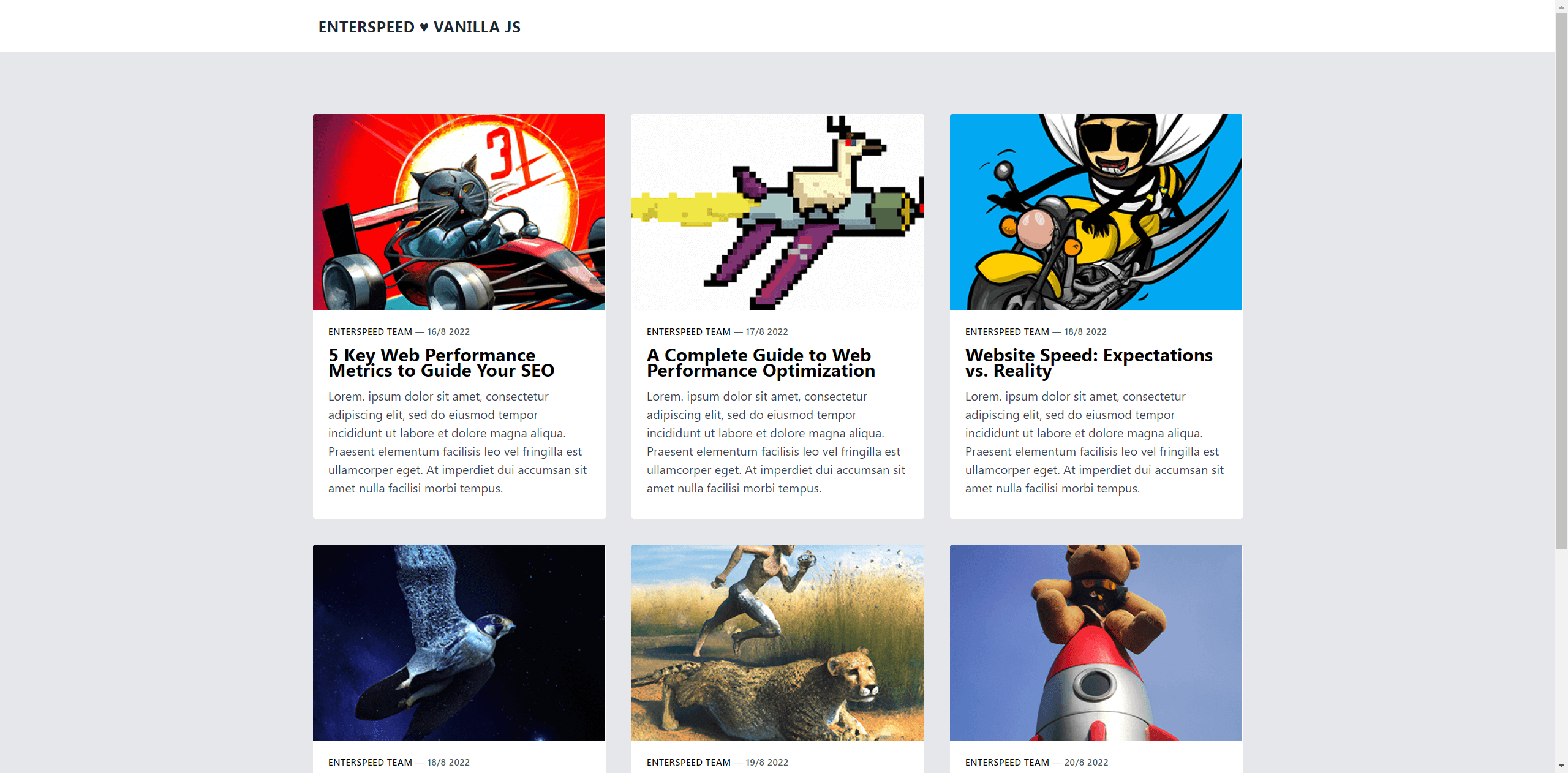
## Creating the website

<img src="https://mintcdn.com/enterspeed/U-p4hKh6hit1rd09/images/docs/examples/vanilla-js-website.png?fit=max&auto=format&n=U-p4hKh6hit1rd09&q=85&s=da7c0746401792e433a6f8668714f0e0" alt="Demo website example" width="2560" height="1262" data-path="images/docs/examples/vanilla-js-website.png" />

### Setting up the HTML

We start by setting up all the HTML that we need. We're including two libraries:

* [Tailwind CSS](https://tailwindcss.com/) to style the page
* [Navigo](https://github.com/krasimir/navigo) to have a simple JavaScript router

```html title="The HTML" theme={null}
<!DOCTYPE html>
<html lang="en">
  <head>
    <meta charset="UTF-8" />
    <meta http-equiv="X-UA-Compatible" content="IE=edge" />
    <meta name="viewport" content="width=device-width, initial-scale=1.0" />
    <title>Vanilla JS demo</title>
    <link rel="icon" type="image/x-icon" href="/favicon.ico" />

    <script
      src="https://cdnjs.cloudflare.com/ajax/libs/navigo/8.11.1/navigo.min.js"
      referrerpolicy="no-referrer"
    ></script>
    <link
      rel="stylesheet"
      href="https://cdnjs.cloudflare.com/ajax/libs/tailwindcss/2.2.19/tailwind.min.css"
      referrerpolicy="no-referrer"
    />
    <style>
      article p {
        padding-bottom: 24px;
      }
    </style>
    <script>
      // All the JS goes here 🎉
    </script>
  </head>

  <body>
    <div
      class="px-4 py-5 mx-auto sm:max-w-xl md:max-w-full lg:max-w-screen-xl md:px-24 lg:px-8"
    >
      <div class="ml-2 text-xl font-bold tracking-wide text-gray-800 uppercase">
        <a href="/">Enterspeed ♥ Vanilla JS</a>
      </div>
    </div>

    <div class="bg-gray-200">
      <div
        id="main"
        class="px-4 py-16 mx-auto sm:max-w-xl md:max-w-full lg:max-w-screen-xl md:px-24 lg:px-8 lg:py-20"
      >
        <div
          id="posts"
          class="grid gap-8 lg:grid-cols-3 sm:max-w-sm sm:mx-auto lg:max-w-full"
        ></div>
      </div>
    </div>

    <div
      class="text-center px-t py-8 mx-auto sm:max-w-xl md:max-w-full lg:max-w-screen-xl md:px-24 lg:px-8"
    >
      Demo by
      <a
        target="_blank"
        rel="noreferrer noopener"
        href="https://enterspeed.com"
        class="hover:text-blue-800"
      >
        Enterspeed
      </a>
    </div>
  </body>
</html>
```

### Initializing the router

Now that we got the structure in place, let's look at the JavaScript needed. First, let's Initialize our router, which takes one mandatory argument - the root path of our site.

```javascript title="Initializing router" theme={null}
const router = new Navigo("/");
```

### Creating the renderHomepage function

Next, let's create a function that renders our homepage.

```javascript title="renderHomePage function" theme={null}
const renderHomePage = () => {
  fetch("/.netlify/functions/enterspeed?handle=blogList")
    .then((response) => response.json())
    .then((data) => {
      const posts = data.data.views.blogList.content;

      posts.forEach((post) => {
        const singlePost = `
          <a href="/post${post.url}"
          class="overflow-hidden transition-shadow duration-300 bg-white rounded border hover:text-blue-800 hover:bg-gray-50"
          data-navigo>
            <img src="${post.thumbnail}" class="object-cover w-full h-64" alt="${post.title}" />
            <div class="p-5 ">
                <p class="mb-3 text-xs font-semibold tracking-wide uppercase">
                    <span class="transition-colors duration-200 text-blue-gray-900">
                        ${post.author.name}
                    </span>
                    <span class="text-gray-600">
                        — ${post.date}
                    </span>
                </p>
                <div class="inline-block mb-3 text-2xl font-bold leading-5 transition-colors duration-200">
                    ${post.title}
                </div>
                <p class="mb-2 text-gray-700">${post.excerpt}</p>
            </div>
          </a>`;
        document.getElementById("posts").innerHTML += singlePost;
      });
    })
    .then(() => {
      router.updatePageLinks();
      router
        .on("/post/:postLink", ({ data }) => {
          renderPostPage(data.postLink);
        })
        .resolve();
    });
};
```

The first thing we do in the function is to fetch content via our `enterspeed.js` function.

We include the query `?handle=blogList` since we want to map out the blog posts in a nice grid overview.

The content is stored in `data.data.views.blogList.content`, which we assign to a const called `posts`.

```javascript title="renderHomePage function -- fetch" theme={null}
  fetch("/.netlify/functions/enterspeed?handle=blogList")
    .then((response) => response.json())
    .then((data) => {

      const posts = data.data.views.blogList.content;
```

Next, we iterate over each of these posts. We create the HTML for the "card" and map the data appropriately. Then we take each card and add it to the `posts` HTML element:

```html title="The posts HTML element" theme={null}
<div
  id="posts"
  class="grid gap-8 lg:grid-cols-3 sm:max-w-sm sm:mx-auto lg:max-w-full"
></div>
```

```javascript title="renderHomePage function -- mapping posts" theme={null}
posts.forEach((post) => {
  const singlePost = `
    <a href="/post${post.url}"
    class="overflow-hidden transition-shadow duration-300 bg-white rounded border hover:text-blue-800 hover:bg-gray-50"
    data-navigo>
      <img src="${post.thumbnail}" class="object-cover w-full h-64" alt="${post.title}" />
      <div class="p-5 ">
          <p class="mb-3 text-xs font-semibold tracking-wide uppercase">
              <span class="transition-colors duration-200 text-blue-gray-900">
                  ${post.author.name}
              </span>
              <span class="text-gray-600">
                  — ${post.date}
              </span>
          </p>
          <div class="inline-block mb-3 text-2xl font-bold leading-5 transition-colors duration-200">
              ${post.title}
          </div>
          <p class="mb-2 text-gray-700">${post.excerpt}</p>
      </div>
    </a>`;
  document.getElementById("posts").innerHTML += singlePost;
});
```

<Info>
  Notice that we have inserted `data-navigo` in the `a` tag. This is so Navigo attaches a click handler which fires the router's navigate method.
</Info>

Finally, to get Navigo to recognize these links we just created, we call the `updatePageLinks` method. When any of the link which has the `data-navigo` attribute gets clicked, it should call the `renderPostPage` function, which we will create next, and give it the post link as an argument.

```javascript title="renderHomePage function -- updatePageLinks" theme={null}
.then(() => {
  router.updatePageLinks();
  router
    .on("/post/:postLink", ({ data }) => {
      renderPostPage(data.postLink);
    })
    .resolve();
});
```

Now, before moving on to the `renderPostPage` function, let's remember to initialize our `renderHomepage` function by calling it.

```javascript title="Initializing renderHomePage()" theme={null}
renderHomePage();
```

### Creating the renderPostPage function

```javascript title="renderPostPage function" theme={null}
const renderPostPage = (postLink) => {
  fetch(`/.netlify/functions/enterspeed?url=/${postLink}`)
    .then((response) => response.json())
    .then((data) => {
      const post = data.data.route.content;

      const postPage = `
            <div class="px-4 py-5 mx-auto sm:max-w-xl md:max-w-full lg:max-w-screen-lg md:px-24 lg:px-8">
              <div class="text-center">
                  <h1
                      class="max-w-lg mb-6 font-sans text-3xl font-bold leading-none tracking-tight text-gray-900 sm:text-4xl md:mx-auto">
                      ${post.title}
                  </h1>
                  <div>
                      ${post.author.name} - ${post.date}
                  </div>
              </div>
              <img src="${post.featuredImage}" alt"=${post.title}" class="rounded shadow-lg my-8 mx-auto" />
              <article id="article" class="text-gray-700 text-lg blogpost">
              </article>
              <div class="block mt-4 mb-8 text-lg font-bold text-gray-800 hover:text-blue-800">
                  <a href="/">👈 Go back</a>
              </div>
            </div>`;
      document.getElementById("main").innerHTML = postPage;
      document.getElementById("article").innerHTML = post.content;
    });
};
```

Just like before, we fetch the content via our `enterspeed.js` function. We use `url=` instead of `handle=`, since we set the route to `url` in our blog posts schema.

The content here is stored in `data.data.route.content`, which we assign to a const called post.

We then create the HTML for the "post" and map the data appropriately.

Lastly, we take our `postPage` and add it to our `main` HTML element:

```html title="The main HTML element" theme={null}
<div
  id="main"
  class="px-4 py-16 mx-auto sm:max-w-xl md:max-w-full lg:max-w-screen-xl md:px-24 lg:px-8 lg:py-20"
></div>
```

...as well as the article itself and add to the article HTML element:

```html title="The article HTML element" theme={null}
<article id="article" class="text-gray-700 text-lg blogpost"></article>
```

Now when navigating to one of the blog posts, we will have a nice, simple article page.

<img src="https://mintcdn.com/enterspeed/U-p4hKh6hit1rd09/images/docs/examples/vanilla-js-website-blogpost.png?fit=max&auto=format&n=U-p4hKh6hit1rd09&q=85&s=94923994f1b5467f3239510dc8c166d1" alt="Demo website blog post example" width="1174" height="1236" data-path="images/docs/examples/vanilla-js-website-blogpost.png" />

The finished results should look something like this:

```html title="The complete index.html" theme={null}
<!DOCTYPE html>
<html lang="en">
  <head>
    <meta charset="UTF-8" />
    <meta http-equiv="X-UA-Compatible" content="IE=edge" />
    <meta name="viewport" content="width=device-width, initial-scale=1.0" />
    <title>Vanilla JS demo</title>
    <link rel="icon" type="image/x-icon" href="/favicon.ico" />

    <script
      src="https://cdnjs.cloudflare.com/ajax/libs/navigo/8.11.1/navigo.min.js"
      referrerpolicy="no-referrer"
    ></script>
    <link
      rel="stylesheet"
      href="https://cdnjs.cloudflare.com/ajax/libs/tailwindcss/2.2.19/tailwind.min.css"
      referrerpolicy="no-referrer"
    />
    <style>
      article p {
        padding-bottom: 24px;
      }
    </style>
    <script>
      const router = new Navigo("/");

      const renderPostPage = (postLink) => {
        fetch(`/.netlify/functions/enterspeed?url=/${postLink}`)
          .then((response) => response.json())
          .then((data) => {
            const post = data.data.route.content;

            const postPage = `
            <div class="px-4 py-5 mx-auto sm:max-w-xl md:max-w-full lg:max-w-screen-lg md:px-24 lg:px-8">
              <div class="text-center">
                  <h1
                      class="max-w-lg mb-6 font-sans text-3xl font-bold leading-none tracking-tight text-gray-900 sm:text-4xl md:mx-auto">
                      ${post.title}
                  </h1>
                  <div>
                      ${post.author.name} - ${post.date}
                  </div>
              </div>
              <img src="${post.featuredImage}" alt"=${post.title}" class="rounded shadow-lg my-8 mx-auto" />
              <article id="article" class="text-gray-700 text-lg blogpost">
              </article>
              <div class="block mt-4 mb-8 text-lg font-bold text-gray-800 hover:text-blue-800">
                  <a href="/">👈 Go back</a>
              </div>
            </div>`;
            document.getElementById("main").innerHTML = postPage;
            document.getElementById("article").innerHTML = post.content;
          });
      };

      const renderHomePage = () => {
        fetch("/.netlify/functions/enterspeed?handle=blogList")
          .then((response) => response.json())
          .then((data) => {
            const posts = data.data.views.blogList.content;

            posts.forEach((post) => {
              const singlePost = `
              <a href="/post${post.url}"
              class="overflow-hidden transition-shadow duration-300 bg-white rounded border hover:text-blue-800 hover:bg-gray-50"
              data-navigo>
                <img src="${post.thumbnail}" class="object-cover w-full h-64" alt="${post.title}" />
                <div class="p-5 ">
                    <p class="mb-3 text-xs font-semibold tracking-wide uppercase">
                        <span class="transition-colors duration-200 text-blue-gray-900">
                            ${post.author.name}
                        </span>
                        <span class="text-gray-600">
                            — ${post.date}
                        </span>
                    </p>
                    <div class="inline-block mb-3 text-2xl font-bold leading-5 transition-colors duration-200">
                        ${post.title}
                    </div>
                    <p class="mb-2 text-gray-700">${post.excerpt}</p>
                </div>
              </a>`;
              document.getElementById("posts").innerHTML += singlePost;
            });
          })
          .then(() => {
            router.updatePageLinks();
            router
              .on("/post/:postLink", ({ data }) => {
                renderPostPage(data.postLink);
              })
              .resolve();
          });
      };

      renderHomePage();
    </script>
  </head>

  <body>
    <div
      class="px-4 py-5 mx-auto sm:max-w-xl md:max-w-full lg:max-w-screen-xl md:px-24 lg:px-8"
    >
      <div class="ml-2 text-xl font-bold tracking-wide text-gray-800 uppercase">
        <a href="/">Enterspeed ♥ Vanilla JS</a>
      </div>
    </div>

    <div class="bg-gray-200">
      <div
        id="main"
        class="px-4 py-16 mx-auto sm:max-w-xl md:max-w-full lg:max-w-screen-xl md:px-24 lg:px-8 lg:py-20"
      >
        <div
          id="posts"
          class="grid gap-8 lg:grid-cols-3 sm:max-w-sm sm:mx-auto lg:max-w-full"
        ></div>
      </div>
    </div>

    <div
      class="text-center px-t py-8 mx-auto sm:max-w-xl md:max-w-full lg:max-w-screen-xl md:px-24 lg:px-8"
    >
      Demo by
      <a
        target="_blank"
        rel="noreferrer noopener"
        href="https://enterspeed.com"
        class="hover:text-blue-800"
      >
        Enterspeed
      </a>
    </div>
  </body>
</html>
```