> ## Documentation Index
> Fetch the complete documentation index at: https://docs.enterspeed.com/llms.txt
> Use this file to discover all available pages before exploring further.
# Organising your schemas
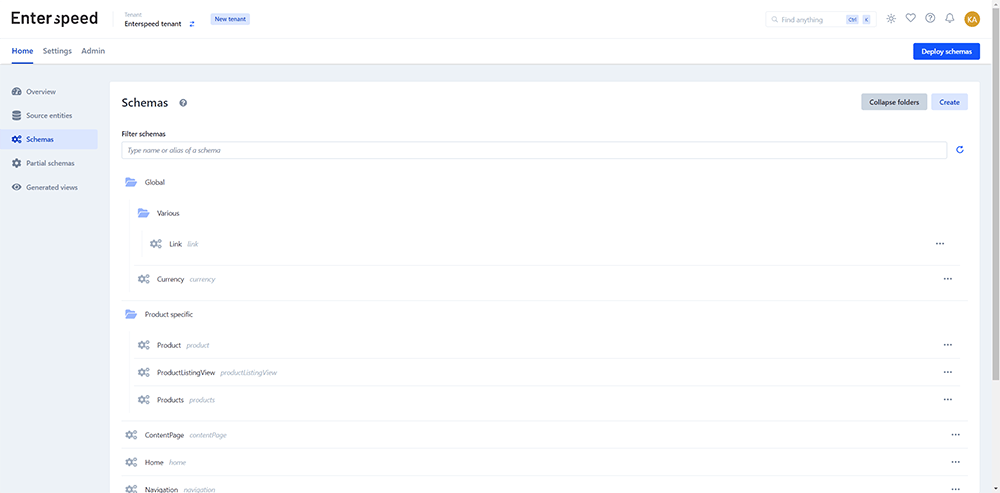 To better structure and organize your schemas, we recommend using our folder feature.
When naming your schema, you can organize them into folders by prepending the name with your desired folder name and slash (`/`).
For instance, if you have a schema called `Currency`, you can name or rename it to `Global/Currency`. This will create a folder called `Global`, while the schema is still called `Currency`.
If you want to delete the folder, simply remove the `Global/` part from the name.
We support folders up to two levels deep, meaning a folder can also have subfolders, for instance `Global/Various/Currency`.
When creating a schema, an alias is automatically generated while you're typing.
In order to not have the folder names "spill" into the alias, folder names will automatically be removed from the alias as soon as you type a slash `/`.
To better structure and organize your schemas, we recommend using our folder feature.
When naming your schema, you can organize them into folders by prepending the name with your desired folder name and slash (`/`).
For instance, if you have a schema called `Currency`, you can name or rename it to `Global/Currency`. This will create a folder called `Global`, while the schema is still called `Currency`.
If you want to delete the folder, simply remove the `Global/` part from the name.
We support folders up to two levels deep, meaning a folder can also have subfolders, for instance `Global/Various/Currency`.
When creating a schema, an alias is automatically generated while you're typing.
In order to not have the folder names "spill" into the alias, folder names will automatically be removed from the alias as soon as you type a slash `/`.