> ## Documentation Index
> Fetch the complete documentation index at: https://docs.enterspeed.com/llms.txt
> Use this file to discover all available pages before exploring further.
# Shopify
The Shopify Destination is currently in preview, reach out if you want to get started.
The Enterspeed Shopify integration uses [destinations](/enterspeed/reference/js/full-schema/actions#destination) to send data from views directly to a configured Shopify shop. This means that you can decide on schema level which views you want to send to Shopify.
You will only have to set the destination field on the entity schema you want to send to Shopify. All schema references are automatically resolved so you don't have to set it on all referenced schemas.
It's possible to configure multiple Shopify destinations if you need to push data to different Shopify shops.
The jobs are executed in bulk requests to avoid hitting API rate limits in Shopify. This means a new bulk job of up to 1.000 jobs is started every minute unless another bulk job on the same shop connection is still active. If another bulk job is active, the integration will wait another minute and try again.
The model you map in the Enterspeed schema looks to some degree like Shopifys product model, however what you map is a unified model containing both product, variant and translation data for a product making it easy to map out the full product in one go.
## Requirements
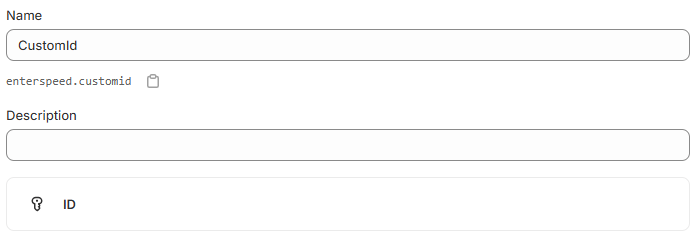
It's required to have a meta field called `enterspeed.customId` of type `ID` on the object types the destination is used for. This field must have the `Filter on the product list and in the Admin API` enabled and is used as an identifier when updating or deleting objects in Shopify through the destination.
 ## Configuration
In order to setup the Shopify configuration you need the following:
| Setting | Description |
| ------------------------------------- | ------------------------------------------------------------------------------------------------------------------------------------------------------------------------------------------------------------------------- |
| Shopify store name | The unique store name in front of .myshopify.com. E.g. \[my store name].myshopify.com |
| Shopify access token | A Developer app API access token with the following permissions: `write_products`, `read_products`, `write_publications`, `read_publications`, `write_locales`, `read_locales`, `write_translations`, `read_translations` |
| Shopify API secret key | A Developer app API secret key |
| Enterspeed Environment Client API Key | The API key for an Enterspeed Environment client. This is used to fetch the view that will be inserted into Shopify |
## Options
Table of available options, that you can optionally specify, if needed for your use case.
| Setting | Description |
| --------------------------- | ---------------------------------------------------------------------------------------------------------------------------------------------------------------------------------------------------------------------- |
| customId | Set your own id of the product, e.g. a SKU number or internal id. |
| shopifyEntityType | The type of entity you want to send to Shopify. Supported values: `product`. |
| statusForNewProducts | The default status for newly created products. Supported values: `Active`, `Draft`, `Archived`, `Unlisted`. If the `status` property is set map directly on the product, this value takes priority over this setting. |
| setOnlyHandleForNewProducts | If the value is `true` the handle value will not be updated when the product is updated, it will on ly be set when the product is created the first time. Default value is `false`. Supported values: `true`, `false`. |
When products are deleted in Enterspeed the Shopify Destination will archive the products i Shopify and not delete them.
## IntelliSense
In order to send data to Shopify the structure of the object you are mapping in the `properties` function must match with the corresponding Shopify model.
To help you bulding the right model, Enterspeed can provide you with IntelliSense. Simply just change the type in the top of the schema from `/** @type {Enterspeed.FullSchema} */` to one of the following:
* `/** @type {Enterspeed.Destinations.Shopify.Schemas.Product} */`
## Example of usage
```js title="Product schema with Shopify destination" theme={null}
/** @type {Enterspeed.Destinations.Shopify.Schemas.Product} */
export default {
triggers: function(context) {
context.triggers('pim', ['product']);
},
actions: function (sourceEntity, context) {
context.destination('shopify').options({
customId: sourceEntity.originId,
shopifyEntityType: 'Product'
});
},
properties: function ({properties: p}, context) {
return {
handle: `${p.name}-${p.itemNumber}`,
title: p.name,
seoTitle: p.name,
type: 'electronic',
tags: ['tag1', 'tag2'],
templateSuffix: p.template
}
}
}
```
```json title="Product schema with Shopify destination" theme={null}
We recommend using JavaScript schemas when working with Shopify destination
as it provides IntelliSense to map the complex models.
```
## What's supported
The integration curerntly only supports the following types: `product` (with variants, prices, translations and so on). The type needs to be defined in the `shopifyEntityType` property in the destination options.
### Meta field types
Meta fields are created as unstructured fields without a definition - see [Shopify documentation](https://shopify.dev/docs/apps/build/custom-data#unstructured-metafields).
You can change the meta fields to structured fields either before or after products are ingested by creating a definition. Note the definition type must match what ever type is mapped in the Enterspeed schema.
Keep in mind that changeing the type in the Enterspeed schema will not change the meta field definition type and the import will fail.
## Configuration
In order to setup the Shopify configuration you need the following:
| Setting | Description |
| ------------------------------------- | ------------------------------------------------------------------------------------------------------------------------------------------------------------------------------------------------------------------------- |
| Shopify store name | The unique store name in front of .myshopify.com. E.g. \[my store name].myshopify.com |
| Shopify access token | A Developer app API access token with the following permissions: `write_products`, `read_products`, `write_publications`, `read_publications`, `write_locales`, `read_locales`, `write_translations`, `read_translations` |
| Shopify API secret key | A Developer app API secret key |
| Enterspeed Environment Client API Key | The API key for an Enterspeed Environment client. This is used to fetch the view that will be inserted into Shopify |
## Options
Table of available options, that you can optionally specify, if needed for your use case.
| Setting | Description |
| --------------------------- | ---------------------------------------------------------------------------------------------------------------------------------------------------------------------------------------------------------------------- |
| customId | Set your own id of the product, e.g. a SKU number or internal id. |
| shopifyEntityType | The type of entity you want to send to Shopify. Supported values: `product`. |
| statusForNewProducts | The default status for newly created products. Supported values: `Active`, `Draft`, `Archived`, `Unlisted`. If the `status` property is set map directly on the product, this value takes priority over this setting. |
| setOnlyHandleForNewProducts | If the value is `true` the handle value will not be updated when the product is updated, it will on ly be set when the product is created the first time. Default value is `false`. Supported values: `true`, `false`. |
When products are deleted in Enterspeed the Shopify Destination will archive the products i Shopify and not delete them.
## IntelliSense
In order to send data to Shopify the structure of the object you are mapping in the `properties` function must match with the corresponding Shopify model.
To help you bulding the right model, Enterspeed can provide you with IntelliSense. Simply just change the type in the top of the schema from `/** @type {Enterspeed.FullSchema} */` to one of the following:
* `/** @type {Enterspeed.Destinations.Shopify.Schemas.Product} */`
## Example of usage
```js title="Product schema with Shopify destination" theme={null}
/** @type {Enterspeed.Destinations.Shopify.Schemas.Product} */
export default {
triggers: function(context) {
context.triggers('pim', ['product']);
},
actions: function (sourceEntity, context) {
context.destination('shopify').options({
customId: sourceEntity.originId,
shopifyEntityType: 'Product'
});
},
properties: function ({properties: p}, context) {
return {
handle: `${p.name}-${p.itemNumber}`,
title: p.name,
seoTitle: p.name,
type: 'electronic',
tags: ['tag1', 'tag2'],
templateSuffix: p.template
}
}
}
```
```json title="Product schema with Shopify destination" theme={null}
We recommend using JavaScript schemas when working with Shopify destination
as it provides IntelliSense to map the complex models.
```
## What's supported
The integration curerntly only supports the following types: `product` (with variants, prices, translations and so on). The type needs to be defined in the `shopifyEntityType` property in the destination options.
### Meta field types
Meta fields are created as unstructured fields without a definition - see [Shopify documentation](https://shopify.dev/docs/apps/build/custom-data#unstructured-metafields).
You can change the meta fields to structured fields either before or after products are ingested by creating a definition. Note the definition type must match what ever type is mapped in the Enterspeed schema.
Keep in mind that changeing the type in the Enterspeed schema will not change the meta field definition type and the import will fail.